9 min
How to Test a Keyboard Properly
A key that seems dead is usually not a broken switch. Test in the right order — registration, rollover, chatter, latency, feel — and you find the real fault.
Take a typing test on two websites and you will very likely get two different speeds. Neither needs to be wrong. A typing score is a formula applied to what you typed, and the formulas, the passages and the rules about mistakes all differ.
8 min read · updated 15 September 2026 · links to 6 tools
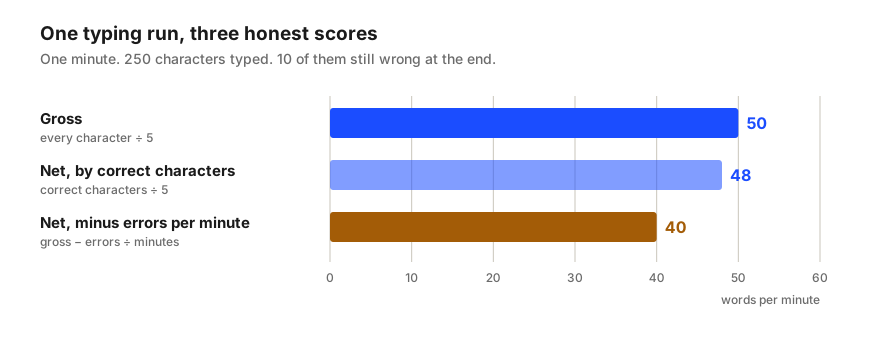
Here is a single one-minute run. You type 250 characters, and when the minute ends, 10 of them are still wrong. Three perfectly respectable typing tests can report three different speeds for it.
| Score | Formula | This run |
|---|---|---|
| Gross WPM | characters typed ÷ 5 ÷ minutes | 250 ÷ 5 ÷ 1 = 50 |
| Net WPM, correct characters | correct characters ÷ 5 ÷ minutes | 240 ÷ 5 ÷ 1 = 48 |
| Net WPM, errors per minute | gross − uncorrected errors ÷ minutes | 50 − 10 ÷ 1 = 40 |
Real words vary in length, so counting them would reward short words and punish long ones. Typing tests settled long ago on a fixed unit instead: five characters, counting spaces and punctuation. Words per minute is characters per minute divided by five, whatever you are typing.
For everyday English the convention is close to reality. The list of common words behind the typing test on this site averages 3.9 letters a word; add the space after each one and a typed word averages 4.9 characters, almost exactly the standard five.
For other material it is not close at all, and that is the point of the convention. The code passage on this site averages 7.2 characters between spaces. At 200 characters a minute, counting real space-separated words would give about 28 words a minute; the five-character rule gives 40, the same as everyday text at the same finger speed, which is what makes the two comparable.
The correct-characters method simply leaves wrong characters out of the count. Each uncorrected mistake removes one character, which is one fifth of a word, so ten mistakes in a minute cost 2 words per minute.
The errors-per-minute method subtracts a whole word per minute for every uncorrected error, spread over the length of the test. Ten mistakes in one minute cost 10 words per minute; the same ten mistakes spread over a five-minute test cost 2. Per mistake it is five times harsher than the correct-characters method.
Neither is more correct. The errors-per-minute method treats a mistake as the time it would take to find and fix it, which suits jobs where errors are expensive. The correct-characters method measures how much right text you produced. What matters is knowing which one a score used before comparing it with another.
Final-text accuracy compares what is on the screen at the end with the passage. Backspace a mistake and retype it correctly, and it no longer counts: fix all your mistakes and final-text accuracy is 100%.
Keystroke accuracy counts every character key you pressed, including the wrong ones you later deleted. Type a 250-character passage perfectly in the end, but press 20 wrong keys on the way, and keystroke accuracy is 250 correct out of 270 pressed: 92.6%. The time spent fixing those mistakes has already come out of your speed.
A test that shows only one accuracy figure is usually showing final-text accuracy, which flatters people who type fast and correct a lot. Keystroke accuracy is the better guide to how cleanly you actually type. The tests on this site show both.
Symbols and capital letters need the Shift key, awkward reaches and more attention, so passages full of them are slower to type at the same skill. The share of characters needing Shift in this site's own passages shows how different the material is:
| Material | Characters needing Shift | Characters between spaces |
|---|---|---|
| Full sentences | 0.7% | 5.4 |
| Punctuation-heavy | 8.3% | 6.0 |
| Code | 12.4% | 7.2 |
| Numbers | 0% | 6.9 |
Short tests usually score higher than long ones. Over 15 seconds you can sprint; over five minutes concentration and stamina start to matter, and most people lose speed. Neither is wrong, but a 15-second score and a five-minute score are not the same measurement, which is why employers who test for real work tend to use longer tests.
Tests also differ in how they handle interruptions. Some stop the clock when you switch away from the page; others keep it running, so a message that pulls you away quietly costs speed. The tests on this site pause while the tab is hidden and report how many seconds were left out.
A key that seems dead is usually not a broken switch. Test in the right order — registration, rollover, chatter, latency, feel — and you find the real fault.
Zero-width spaces, non-breaking spaces, curly quotes, lookalike letters and accents stored two ways make identical text fail to match. How to find each.