10 min
How to Check a New Monitor Before the Return Window Closes
Dead pixels, backlight bleed and IPS glow are three different things with three different verdicts. Here is what to check, and what counts as a defect.
A monitor's size is one number measured corner to corner, and that single number is expected to describe two dimensions. It cannot. Two screens with the same diagonal can have very different widths, heights and areas, and a screen with a larger diagonal can be the smaller of the two.
8 min read · updated 17 September 2026 · links to 7 tools
The diagonal, width and height of a screen form a right-angled triangle, so the diagonal fixes the size only once the shape is known. For a screen of aspect ratio w:h and diagonal d, the width is d × w ÷ √(w² + h²) and the height is d × h ÷ √(w² + h²).
The wider the ratio, the more of the diagonal goes into width and the less into height. That is why an ultrawide needs a much larger diagonal just to stay as tall as an ordinary monitor.
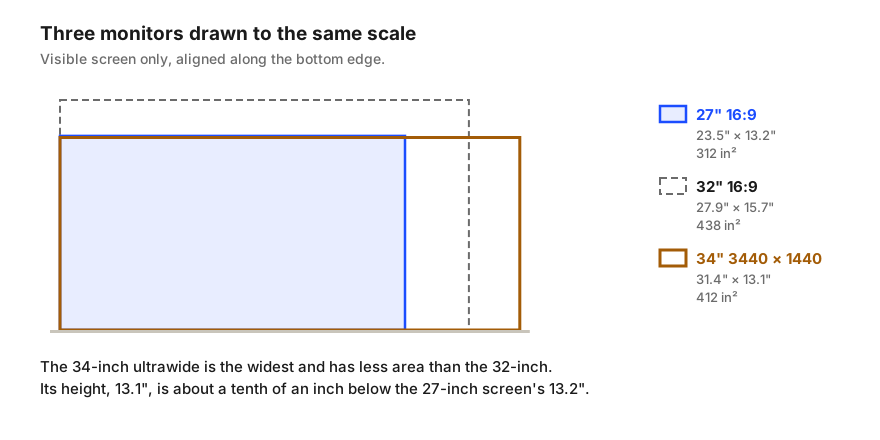
Every figure below is the visible screen, without the bezel, calculated from the diagonal and the panel's real pixel ratio.
| Monitor | Width | Height | Screen area | Pixel density |
|---|---|---|---|---|
| 24" 1920 × 1080 (16:9) | 20.9" | 11.8" | 246 in² | 92 PPI |
| 27" 2560 × 1440 (16:9) | 23.5" | 13.2" | 312 in² | 109 PPI |
| 27" 2560 × 1600 (16:10) | 22.9" | 14.3" | 328 in² | 112 PPI |
| 32" 3840 × 2160 (16:9) | 27.9" | 15.7" | 438 in² | 138 PPI |
| 34" 3440 × 1440 ultrawide | 31.4" | 13.1" | 412 in² | 110 PPI |
| 49" 5120 × 1440 super ultrawide | 47.2" | 13.3" | 626 in² | 109 PPI |
Ultrawide monitors are sold as 21:9, but the common ultrawide panels are not exactly that shape. A 3,440 by 1,440 panel is 43:18, about 2.39 to 1; a 2,560 by 1,080 panel is 64:27, about 2.37 to 1; a true 21:9 is 2.33 to 1. The label is a rounded family name.
The rounding matters when you compare heights, because the gap between an ultrawide and a 27-inch monitor is tiny. Taken as a true 21:9, a 34-inch screen would be 13.4 inches tall, slightly taller than a 27-inch 16:9 at 13.2. The real 3,440 by 1,440 panel is 13.1 inches tall, slightly shorter. Either way the heights are within a quarter of an inch, which is the useful conclusion: a 34-inch ultrawide is a 27-inch monitor's height with about eight more inches of width. Its height matches a 26.8-inch 16:9 screen.
Screen area grows with the square of the diagonal but shrinks as the shape gets wider, so a wide screen gives up area for the same diagonal. A 34-inch ultrawide has 412 square inches; a 32-inch 16:9 has 438. The ultrawide is 6% smaller in area despite the two-inch larger diagonal.
Super ultrawides make the relationship easy to see. A 49-inch 32:9 screen is 47.2 inches wide and 13.3 inches tall. Two 27-inch 16:9 monitors side by side are 47.1 inches wide and 13.2 inches tall, not counting the bezels between them. A 49-inch super ultrawide is, almost exactly, two 27-inch monitors with the gap taken out.
Size and sharpness are separate questions. Pixel density, in pixels per inch, depends on both the resolution and the size, and it is what decides whether text looks crisp or shows its pixels. Divide the diagonal resolution in pixels by the diagonal in inches to get it.
This is where the ultrawide makes sense. A 34-inch 3,440 by 1,440 panel and a 27-inch 2,560 by 1,440 panel both run at about 110 pixels per inch, with the same 1,440 rows of pixels. Text is the same size and sharpness on both; the ultrawide simply adds columns. A 27-inch 4K screen, by contrast, packs 163 pixels per inch into the same size as the 1,440-line 27-inch.
Distance changes what density you need. The viewing distance calculator estimates how far away individual pixels stop being visible to normal vision: about 80 cm for a 27-inch 2,560 by 1,440 screen, and about 54 cm for a 27-inch 4K one. Most people sit 50 to 75 cm from a monitor, which is why the extra density of 4K at 27 inches is visible at a desk.
To see the resolution and scaling a screen you already own is running at, the screen resolution checker reads them from the browser, and the sharpness test shows whether scaling is softening text.
Dead pixels, backlight bleed and IPS glow are three different things with three different verdicts. Here is what to check, and what counts as a defect.
Storage is sold in powers of 1,000 and often shown in powers of 1,024; internet speed is sold in bits and shown in bytes. The arithmetic behind both gaps.