11 min
Why a Key Does Not Register
A key press passes through seven layers before a page sees it, and only three of them travel with the keyboard. Check them in order to find the real fault.
A doubled letter has three possible causes, and they need three completely different responses. One is a setting, one is a worn part, and one is simply a quick finger.
10 min read · updated 13 September 2026 · links to 4 tools
From the screen, all three produce the same symptom: two letters where you expected one. Underneath, they are completely different events, and a good tester can tell them apart because the browser reports enough detail to do so.
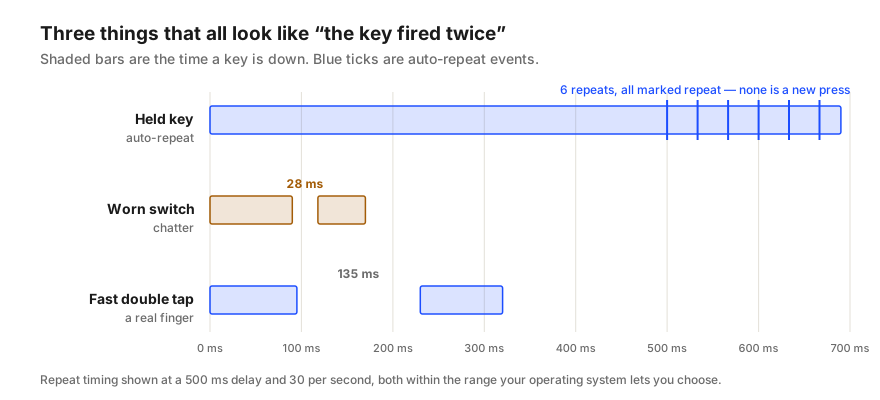
Hold a key down and nothing happens for a moment. Then the operating system starts sending the key again at a steady rate until you let go. That is auto-repeat, and it is why holding Backspace deletes a whole line.
Two settings control it. The repeat delay is how long you must hold before the first repeat; the repeat rate is how fast repeats arrive after that. On Windows the delay offers four steps from about a quarter of a second to about one second, and the rate runs from about 2.5 to about 30 repeats a second.
A browser marks each of these events as a repeat, and the key produces only one release event, when you finally let go. That combination — many events, a repeat marker on all but the first, a single release at the end — is the unmistakable signature of a held key.
| Setting | Slowest | Fastest |
|---|---|---|
| Repeat delay (Windows) | about 1 second | about 250 ms |
| Repeat rate (Windows) | about 2.5 per second, one every 400 ms | about 30 per second, one every 33 ms |
Inside a key switch, two metal contacts touch to complete a circuit. They do not meet cleanly: for a few milliseconds they bounce, making and breaking contact several times. Every keyboard expects this and ignores it with a short window called debounce. Mechanical switch makers commonly specify bounce of under 5 milliseconds, and the widely used QMK keyboard firmware debounces for 5 milliseconds by default.
Chatter happens when a switch starts bouncing for longer than its keyboard's debounce window, usually because the contacts are worn, oxidised or dirty. The extra bounce slips through and becomes a second press.
In the event stream, chatter looks nothing like auto-repeat. There is a press, a release, and then a completely new press — not marked as a repeat — very shortly afterwards. And it happens on a single deliberate tap, which a held key never does.
People can tap a key twice quickly, especially while typing a doubled letter at speed. That produces two genuine presses, and the gap between releasing the key and pressing it again can be short.
This is why a careful tester treats a quick second press as an observation rather than a verdict. The chatter test flags a key that registers again less than 60 milliseconds after its own release, but a single flag proves little. What separates a worn switch from a quick finger is repetition: chatter keeps happening on the same key when you deliberately tap it once, slowly, dozens of times.
Auto-repeat needs no repair. Lengthen the repeat delay, or slow the repeat rate, in your operating system's keyboard settings.
Chatter sometimes responds to cleaning. Blow out the switch with compressed air, and on a mechanical switch a small amount of contact cleaner worked in by pressing the key repeatedly can clear oxidation. On a hot-swap keyboard, simply replacing the switch takes a minute. Some programmable keyboards let you lengthen the debounce time in firmware such as QMK, which hides the symptom at the cost of a little extra delay on every key — a workaround, not a repair.
A fast double tap is not a fault at all, and there is nothing to fix.
Not every doubled character starts at the keyboard. Autocorrect and typing-assistance features, text expanders, remapping tools and some remote-desktop and virtual-machine clients can all insert or repeat characters.
The clean way to separate them is to type the problem key into a tester that reports raw key events. If one tap shows exactly one press there, but two letters appear in your word processor, the keyboard is innocent and the software on that machine is doing the doubling.
A key press passes through seven layers before a page sees it, and only three of them travel with the keyboard. Check them in order to find the real fault.
A key that seems dead is usually not a broken switch. Test in the right order — registration, rollover, chatter, latency, feel — and you find the real fault.