9 min
How to Test a Keyboard Properly
A key that seems dead is usually not a broken switch. Test in the right order — registration, rollover, chatter, latency, feel — and you find the real fault.
Hold down six letters and press a seventh, and on many keyboards the seventh never arrives. The keyboard is not broken and the key is not faulty. The limit is written into the simplest way a USB keyboard talks to a computer.
8 min read · updated 21 September 2026 · links to 5 tools
A USB keyboard does not report each press as it happens. Instead, the computer asks it for its current state many times a second, and the keyboard answers with a short message listing every key that is down. The simplest format for that message is called the boot keyboard report, because it is the one every computer understands before any special software has loaded, including the setup screens you see while a PC starts.
The boot report is exactly eight bytes long, and each byte has a fixed job. The codes in it are the keyboard's own numbers for each key; a browser translates them into names of its own, which the key code viewer shows as you press each key.
| Byte | Holds | Keys it can carry |
|---|---|---|
| 0 | Modifier bits: left and right Ctrl, Shift, Alt and GUI (Windows or Command) | 8, one bit each |
| 1 | Reserved, always ignored | 0 |
| 2 to 7 | One key code per byte for every other key | 6 |
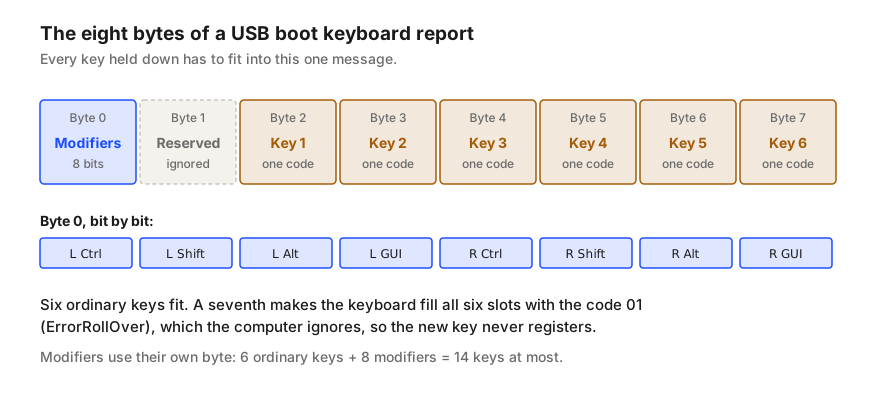
With six ordinary keys already down, the report is full. The rules for USB keyboards say what to do next: instead of dropping one key and keeping the others, the keyboard fills all six slots with a special code, 01, called ErrorRollOver. It means “too many keys to report”.
The computer treats a report full of ErrorRollOver as no new information and keeps the keys it already knew about. So the seventh key simply does not appear, and neither does anything else pressed until one of the six is released. Nothing is lost permanently and nothing is damaged; the message was just too small.
6-key rollover, or 6KRO, is the name for exactly this limit: any six ordinary keys, plus modifiers, register together. For typing it is far more than enough, because nobody holds seven letters at once while writing. It matters in games that use many keys together, in music software played from the keyboard, and in stenography, where whole chords of keys are pressed at the same moment.
N-key rollover, or NKRO, means every key can be down at once and still be reported. Over USB that needs a different message: instead of six slots, the keyboard sends a map with one bit for every key on the board, so the size of the message no longer limits the count. The older PS/2 connection never had the six-key ceiling at all, because it sent each press and release as a separate message.
The larger NKRO message is only understood once the operating system has loaded its keyboard driver. A computer's start-up and setup screens, and some KVM switches and adapters, only understand the eight-byte boot report. To stay usable everywhere, some NKRO keyboards start in 6KRO mode, fall back to it when they are not sure what they are connected to, or offer a key combination to switch between the two.
So a keyboard advertised as NKRO can quite correctly behave as 6KRO on a particular computer or through a particular hub. If a test shows six keys where you expected more, check the keyboard's manual or software for a rollover setting before assuming a fault, and try it connected directly to the computer rather than through a hub or adapter.
Ghosting is a different fault with a different cause. Inside most keyboards the keys are wired in a grid of rows and columns, and the controller finds a press by looking for a connected row and column. When three held keys form three corners of a rectangle in that grid, the fourth corner can look pressed too. Keyboards either report that extra “ghost” key, or, more often, block a key to avoid reporting one.
The practical difference: a rollover limit depends on how many keys you hold, whichever keys they are. A ghosting problem depends on which keys you hold, so a keyboard can manage ten keys in one combination and fail on three in another. Test both, separately.
| Rollover limit | Ghosting or blocking | |
|---|---|---|
| Cause | The size of the message sent to the computer | The wiring grid inside the keyboard |
| Depends on | How many ordinary keys are held | Which particular keys are held |
| Typical symptom | The seventh key never appears, whichever it is | One specific combination fails, often three or four keys |
| Changes with | A rollover setting or a different connection | Nothing; it is built into the board |
A key that seems dead is usually not a broken switch. Test in the right order — registration, rollover, chatter, latency, feel — and you find the real fault.
A key press passes through seven layers before a page sees it, and only three of them travel with the keyboard. Check them in order to find the real fault.