11 min
Why a Key Does Not Register
A key press passes through seven layers before a page sees it, and only three of them travel with the keyboard. Check them in order to find the real fault.
Two browsers, one mouse, two different polling rates — and neither browser is lying. A web page never sees the mouse directly; it sees what the browser chooses to hand over, and browsers hand over different things.
10 min read · updated 13 September 2026 · links to 4 tools
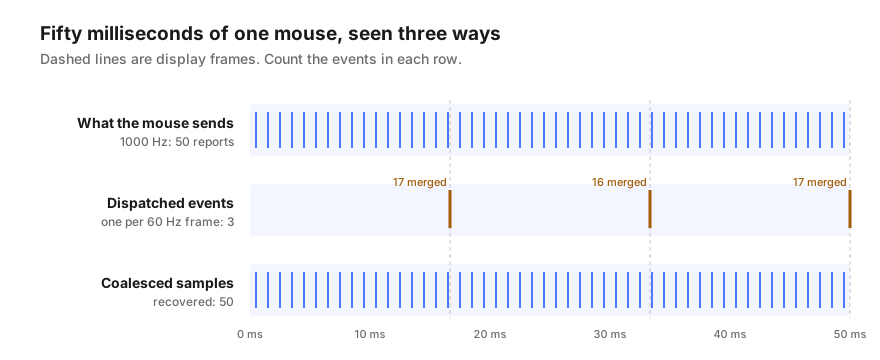
Take a 1,000 Hz mouse on a 60 Hz display and move it for fifty milliseconds. The mouse sends fifty reports. A page that only listens to ordinary pointer events receives three. A page that asks for the samples merged into those three events gets all fifty back.
Every polling rate tester is choosing one of those rows, whether it says so or not. That single choice explains most of the disagreement between testers and between browsers.
A USB mouse is asked for news at a fixed interval, and the polling rate is how often. A basic office mouse commonly reports 125 times a second, once every 8 milliseconds. Gaming mice usually offer 500 and 1,000, and some recent models go to 4,000 or 8,000.
There is an important catch before any browser gets involved: a mouse only sends a report when it has something to say. Held still, it says nothing. Moved slowly, it can have no movement to report on some intervals and skip them. That is why every polling test asks for fast, continuous movement, and why a gentle wiggle reads low on any tester, in or out of a browser.
A page has no use for a thousand position updates a second if it can only draw sixty frames. So browsers commonly collect the movement that arrives between frames and dispatch it as a single pointer event, carrying the latest position. This saves a great deal of work, and for nearly every page it is invisible.
For a polling test it is decisive. A tester that times ordinary pointer events is measuring how often the browser dispatches them, which tracks the display refresh rate. On a 60 Hz screen that tends to read near 60; on a 144 Hz screen, nearer 144. The mouse is not involved in that number at all.
Browsers that merge movement usually keep the individual samples too. A page can ask each pointer event for them with getCoalescedEvents(), and receives the list of movements that were folded into it, each with its own timestamp. Counting those gets much closer to what the mouse sent.
Some browsers go further with an event called pointerrawupdate, which fires as movement arrives rather than once per frame, and is only available on secure pages. Support for both varies between browsers and versions, so a careful tester detects what is available and says which method produced its number. The polling rate test shows all three side by side, marking any the browser does not support.
Precise timers can be abused to fingerprint visitors and to measure things a page should not see, so browsers deliberately limit how finely a page can read the time. Depending on the browser and its security settings, timestamps may move in steps of a tenth of a millisecond or more.
That matters more than it sounds, because there are two ways to turn timestamps into a rate. One takes the typical gap between samples and inverts it. The other counts how many samples arrive over a stretch of continuous movement. When the clock is rounded, the first can be badly wrong while the second stays right. The figures below come from running both methods over simulated mice with rounded clocks.
| Mouse | Clock step | Typical-gap method reads | Counting method reads |
|---|---|---|---|
| 1,000 Hz | 1 ms | 1,000 Hz | 1,000 Hz |
| 2,000 Hz | 1 ms | 1,000 Hz | 2,001 Hz |
| 4,000 Hz | 1 ms | 1,000 Hz | 3,999 Hz |
| 4,000 Hz | 0.1 ms | 3,333 Hz | 4,000 Hz |
| 8,000 Hz | 0.1 ms | 10,000 Hz | 8,000 Hz |
A browser test is excellent at one job: telling whether a mouse is running at a basic rate or a gaming rate, and showing whether a setting change actually took effect. It is poor at verifying very high rates, and it cannot see anything the operating system or the browser keeps from the page.
The same honesty applies to the other mouse checks. A double-click test can show a switch registering twice, and a pointer latency test can show the cursor trailing your hand, but both measure what the browser delivers, not the hardware directly.
A key press passes through seven layers before a page sees it, and only three of them travel with the keyboard. Check them in order to find the real fault.
Dead pixels, backlight bleed and IPS glow are three different things with three different verdicts. Here is what to check, and what counts as a defect.