11 min
What Password Strength Actually Measures
Strength is a number, and the number is bits. Sixteen lowercase letters beat eight of every symbol on the keyboard by six million times the work.
A search finds nothing for a word that is plainly on the page. A spreadsheet lookup fails on a name you can read with your own eyes. A password that you are sure you typed correctly is refused. The screen is not lying, but it is not telling you everything either.
9 min read · updated 15 September 2026 · links to 8 tools
Every character in a text is stored as a number called a code point. The letter h is U+0068, an ordinary space is U+0020. A font turns those numbers into shapes, and some numbers are deliberately drawn as nothing at all, or as the same shape as a different number. Comparison, searching and sorting all work on the numbers.
So “hello world” typed on a keyboard and “hello world” pasted from a web page can be different strings. In the figure below, the pasted copy carries one extra character that has no width. It is one character longer and three bytes longer in UTF-8, the encoding almost every web page and file uses, and no amount of looking will show it.
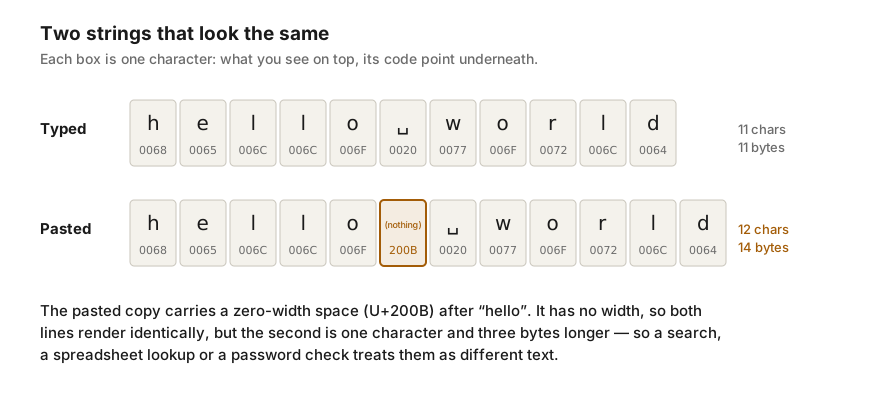
Each pair in this table looks the same in most fonts. The lengths and byte counts come from running the pairs through the tools on this site.
| Looks like | What is really there | Characters | UTF-8 bytes |
|---|---|---|---|
| hello world | A zero-width space (U+200B) before the space | 11 vs 12 | 11 vs 14 |
| hello world | A non-breaking space (U+00A0) instead of a space | 11 vs 11 | 11 vs 12 |
| don't | A curly apostrophe (U+2019) instead of a straight one | 5 vs 5 | 5 vs 7 |
| café | e followed by a combining accent (U+0301) instead of é (U+00E9) | 4 vs 5 | 5 vs 6 |
| paypal | A Cyrillic а (U+0430) instead of a Latin a | 6 vs 6 | 6 vs 7 |
The zero-width space, zero-width joiner, zero-width non-joiner, word joiner and byte-order mark are all drawn as nothing. They arrive through copying from web pages, PDFs, chat apps and some editors, and a byte-order mark often sits at the very start of a file saved as “UTF-8 with BOM”, where it breaks the first value of a CSV or the first line of a script.
They are the most common reason a pasted value fails to match, and the easiest to remove. The invisible character detector lists each one by name and position, and Text Cleaner removes them.
A non-breaking space stops a line from wrapping between two words, which is why web pages use it between a number and its unit. It is drawn exactly like a space, and it is a different character. Copy a product name or a price from a web page and there is a good chance one is inside it.
Spreadsheets are where this hurts most. Microsoft documents that Excel's TRIM function removes only the ordinary space, character 32, so a cell carrying a non-breaking space, character 160, still refuses to match after trimming. Replacing character 160 with a normal space first, or cleaning the text before it reaches the sheet, fixes the lookup.
Word processors and phone keyboards replace straight quotes with curly ones and double hyphens with dashes as you type. That is good typography and bad data: a curly apostrophe in a password, a search term, a spreadsheet formula or a line of code is a different character from the straight one the other side expects.
Going the other way is just as easy to get wrong, so convert deliberately. Smart Quotes Converter turns straight quotes into curly ones or back, and Text Cleaner straightens them as one of its switches.
An accented letter such as é can be stored as a single character, or as a plain e followed by a separate combining accent. Both draw the same, and the second is one character longer. Text typed on one system and pasted from another can mix the two, and older Mac disks stored file names in the separated form, which is why a file name can look right and still not be found.
The fix is normalisation: converting both texts to the same form before comparing them. Most programming languages provide it, usually as a function called normalize, and the composed form, NFC, is the usual choice. The stricter NFKC form goes further and also turns a non-breaking space into a plain space, but it does nothing about zero-width characters or letters from other alphabets. Removing invisible characters does not fix this case either, because both forms are made of visible characters. To see which form a text uses, look at its code points in Unicode Character Lookup.
Cyrillic and Greek both contain letters with the same shape as Latin ones: the Cyrillic а, е, о, р and с, the Greek ο and ν. Mixed into a Latin word they are invisible to a reader and completely different to a computer. That is the basis of lookalike web addresses and usernames built to impersonate real ones, and it also happens innocently when someone switches keyboard layouts halfway through a word.
Cleaning cannot fix this, because these are real letters with a real job in their own language. The homograph checker flags them and names the Latin letter each one imitates, so they can be retyped.
In code, configuration files and lists, the differences are often in the whitespace: a space left at the end of a line, a tab where the other copy has spaces, or a Windows line ending (CR LF) where the other has a Unix one (LF). A comparison by characters shows the first two: Text Compare draws tabs as → and spaces at the end of a line as ·.
Line endings need a different approach. A text box in a web browser converts Windows line endings to LF the moment text is pasted, so two files that differ only in their line endings will look identical in any browser tool you paste them into. Check line endings in a code editor, which normally shows them in its status bar, or change them with Line Ending Converter.
Strength is a number, and the number is bits. Sixteen lowercase letters beat eight of every symbol on the keyboard by six million times the work.
The same typing run can score 50, 48 or 40 WPM depending on the test. How gross and net speed, accuracy, the material and the test length change the number.